Tuesday, November 20, 2012

Power over Ethernet (PoE): A Modern Solution

The evolving standards of PoE

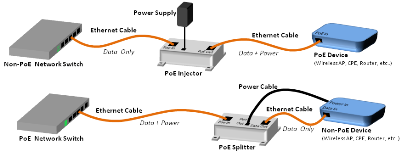
(blogger@L-com.com) Part of L-com's diagram showing two of the four PoE system models

The IEEE standards for providing PoE have been around for almost a decade now, but the actual technology to accomplish this is even older.  The original concept was pretty simple: Category 5 cabling has eight conductors, but the standard really only used four of them.  The low-voltage power could be run along the unused conductors to provide enough power for most simple devices. Through the use of an "injector" at one end and a "tap" at the other end, the power could travel along without noticeable problems with the data. Within a few years, manufacturers of many different types of IP equipment began implementing designs that would accept power directly from the cable, eliminating the need for a "tap".  Next, manufacturers of the Ethernet switching equipment developed PoE Injector Hubs to directly inject the power into the cable, eliminating the need for an "injector".  But there were three big problems:

Tuesday, August 07, 2012

Weatherproof Enclosures for All Types of Weather

Applications for Weatherproof Enclosures

(blogger@L-com.com) Diagram of a PoE Powered Weatherproof Enclosure

When we talk about weatherproof enclosures, we really mean weatherproof. Not just a simple plastic box to keep out the occasional light rain, but heavy duty boxes, many of them NEMA rated, designed for one purpose: provide extreme protection for the sensitive electronic equipment that you must install outdoors.

Extreme protection involves many things: protection from dust, dirt, grease, and oil; protection from water, either light sprinklings or outright downpours; protection from theft and tampering when installed in an unsecure location; and protection from unusual heat and sub-zero cold. While there are a huge variety of weatherproof enclosures out there, the biggest challenge of installing electronics outdoors is temperature fluctuation.

Wednesday, July 25, 2012

Three Quality Grid Antenna Factors

3 Factors in a Quality Grid Antenna

(blogger@L-com.com)
Grid Antenna - A type of antenna which employs an open-frame grid as a reflector, rather than a solid one. The grid spacing is sufficiently small to ensure that waves of the desired frequency cannot pass through, and are hence reflected back toward the driven element.

A typical grid antenna mounted on a pole or mastGrid antennas are very popular for directional wireless applications. They provide a nice, controlled beam width and a high relative gain, and their grid construction makes them resistant to wind. But there are a lot of options out there, ranging from the very cheap to the very expensive. How do you know what you need? What are the factors you should consider before you place your order? We have three suggestions that make sense.

Monday, July 16, 2012

Shielded Waterproof USB Cables, Bulkheads, and Covers

Waterproof USB: Shielded vs. Unshielded

(blogger@L-com.com) Shielded Waterproof USB 2.0 Cable with Type A Female to Type A Male

A lot of people already know about L-com's large selection of waterproof and IP67 rated USB cables, panel-mount adapters, and connector covers. But do you know about the various shielding options available? In order to ensure the high-speed connection that USB technology offers, it is important to ground the shield in the cable, and that goes the same for the waterproof cables.

Tuesday, July 10, 2012

How Important are Right Angles in Connectivity?

Why Use a Right Angle Cable or Adapter?

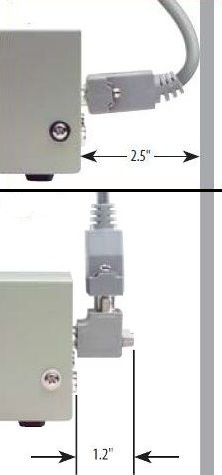
(blogger@L-com.com) Compare a bent cable to L-com's right angle D-sub adapter

L-com offers a lot of right angle products, including cable assemblies with right angle connectors at the ends, and adapters that allow cables to bend at 90°. And they're continuing to add more right angle equipment every month, as this recent press release shows. One question is: why? Why are right angle products so popular, and why is their popularity gaining? What is the problem that they are solving?

Thursday, June 28, 2012

Dust Caps for Electrical Connectors

Covers for Your Connectors

(blogger@L-com.com) L-com's unique cover for CN24 connectors on IEEE-488 GPIB products

When you look at an entire link between devices, from terminal to server, for instance, the highest vulnerability point is at the connectors. That's because they are two separate products, most often a jack and a plug, that must correctly mate and allow the signal to pass with minimal loss. It's no surprise that the more connections you have in a link, the greater the loss overall.

Because they are so important and vulnerable, many people buy inexpensive connector covers to protect the connectors from anything that could harm them, including things like dust and particulates, moisture, and damage from moving or shipping the device or cable. Did you know that investing a small amount in dust cap protectors could dramatically extend the life of your devices and cables?

Thursday, June 21, 2012

Fiber vs. Copper in LANs

The Fiber Optic Technology Future

(blogger@L-com.com) Fiber Optic Cable Fanned Out

The emerging field of fiber optics is no longer emerging; it's here. That's because manufacturers get better at making fiber cables and lasers each year, all amidst some of the highest prices for copper we've seen. Already, dead-run fiber networks are cheaper and greener than twisted pair cabling. Fiber is here. Are you ready?

Wednesday, June 13, 2012

Lightning Protection: A Little Reminder

How To Protect Your Electronic Equipment

(blogger@L-com.com) Lightning ;)

As we enter the "high lightning" season, L-com likes to remind people of the dangers of leaving permanent or semi-permanent cabling installations unprotected from surges. There are a couple of parts to this overall problem. First, you have to realize the danger is with every installation of conductive material. The copper in Ethernet networking cables, or in coaxial cables that link up an antenna, or in the process control lines that prevent system failures; they all can have surges and the surges can all have the same catastrophic effects. Some people think this only happens with a direct strike, but even indirect strikes nearby can be destructive. Second, you have to take the time to find the appropriate lightning protection for your system. And third, you have to install the lightning protection properly so it is grounded.

Tuesday, June 05, 2012

Antenna Coaxial Cable Types

What kind of coax cable do antennas need?

(blogger@L-com.com) Low Loss Cable Diagram

As a major US Antenna manufacturer, L-com gets this question quite often. After all, if you are searching for an antenna, you may not think about the cabling requirements up front. But every antenna needs to be connected to a radio, and often the radio and antenna are not placed close together, so a coaxial cable is necessary.

So what kind of cable do you need?

Thursday, May 31, 2012

USB Problems and How To Fix Them

Unique USB Fixes to Common Problems

(blogger@L-com.com)

USB Product Video

USB products are everywhere. From cell phones, smart phones, digital cameras, tablet computers, camcorders, and just about every other gadget uses USB connectors on it. So you are very likely to need a USB cable, adapter, or other connectivity item as a common fact of modern life.

But USB isn't perfect. 

Thursday, May 24, 2012

How to Create RJ45 Ethernet Ports at Drop Points

RJ45 couplers: what is available (blogger@L-com.com) RJ45 Coupler Overview Video

L-com carries a lot of stuff. In fact, the L-com web site boasts over 15,000 unique product pages. But among all those varied parts, one of the most popular items fits in the palm of your hand and weighs approximately 1 oz. What is it? An Ethernet jack! Here, we're going to talk briefly about Ethernet jacks, but don't miss L-com's exclusive video on the topic!

Thursday, May 17, 2012

The Physical Infrastructure of Your LAN

How to build a high performance network (blogger@L-com.com) A typical rack enclosure for network infrastructure

An Ethernet network is composed of three things: active equipment (routers, switches, AP's, servers, etc.), passive equipment (bulk cable, cable assemblies, connectors, adapters, jacks, antennas, etc.), and a framework (racks, enclosures, patch panels, cable run ladders, faceplates at the drop point, etc.). Today, I'd like to talk about the third part: the network framework.

Tuesday, May 08, 2012

What is L-com?

What is L-com? (blogger@L-com.com) L-com Global Connectivity

L-com Global Connectivity was founded in 1982 as a family-run business to supply the burgeoning connectivity industry with quality cables, connectors, adapters, and other passive signal connectivity equipment. Today, L-com is still a privately held corporation headquartered in North Andover, MA, with four locations world wide. One of those locations, in Boca Raton, FL, is HyperLink Technologies, a quality wireless manufacturer that L-com acquired in 2007 and incorporated into its overall product offering. As a whole, L-com Global Connectivity is one of the world's most comprehensive and high-quality sources for both wired and wireless connectivity products. Not only does L-com have a huge in-stock product offering, available on its L-com.com eCommerce site, but they are a premier supplier of custom built products for large scale military, aerospace, and OEM companies. Though the way we connect electronics has changed quite a bit over the years, L-com still provides its award winning customer service, free print catalog, and free technical information on its web site.

Monday, February 26, 2007

Serial Cables - Serial Data Communication


Serial Connectivity (customerservice@L-com.com)

As technology has advanced and we've needed to pass more and more data more and more quickly between devices, serial communication has become more important. Serial communication transmits data in a precise series so that minimum skewing or modulation occurs. While it isn't as fast as parallel communication in short distances, it is superior, especially in long distances and when speed isn't exactly an issue, to older standards.

In order to make sure that all manufacturers that used serial communication could connect together, the EIA/TIA created the RS-232 standard. This way, serial keyboards, joysticks, scanners, and other equipment could be connected to terminals like computers. That same standard is followed today, but affects mainly the devices being connected, not the connection itself. Two devices with RS-232 compliant ports should be able to connect with any serial cables.

The most common connector type on a serial cable is the DB-9 connector. This D-Subminiature style connector has 9 pins in a "D" shaped footprint. L-com carries a wide variety of these types of cables, including economy D-Sub cables, deluxe, and premium (double shielded) style. These are all molded and factory terminated and tested.

Wednesday, February 21, 2007

Coaxial Crimp Tools


Coax Crimping Tools (customerservice@L-com.com)

Coax cables are relatively easy to put together, if you have the right equipment and know what you're doing. That is because most coax connectors are "crimp style". That isn't to say all of them are, but twist-ons don't always get as great a connection, solder styles are sometimes sensitive to bending and flexing, and compression styles are just rare.

If you are going to be making a lot of coax cable assemblies, you'll need a coax crimping tool. These are fairly wrench-like in shape and design, but in the jaws of the devices there is a "hex" shaped hole. Different coax connectors require different sized hexes to properly crimp them.

When you are buying coax connectors, make sure to check with the manufacturer what the crimping dimensions are. At L-com, we usually put them on the engineering drawing, which you can freely download from our site. Once you know the crimping dimensions, make sure that you have or that you get a crimping tool with the correct sized hex die. Many crimping tools have the dies already permanently attached so you don't have to worry about losing extra pieces. But other crimp tools are more like frames for interchangeable dies, allowing you to use the same tool in multiple situations.

If you need help selecting a tool for your job, contact us at L-com and we will walk you through it!

Thursday, February 15, 2007

Category Rated Modular Couplers


Modular Couplers for Phone and Ethernet (customerservice@L-com.com)

One of the great things about modular networks is that they're... well... modular! Networks in these cases are easily set up and customizable to whatever architecture you'd like to employ.

A key component of modular networks are the couplers. Most often these are designed to be panel mountable, so they can be mounted either in a wiring closet rack panel, or in a faceplate or wall plate at a workstation.

Because modular couplers have become so ubiquitous, a large variety of colors, shapes, and make-ups are now available. L-com carries a line of modular couplers called the ECF series that have a flange that can be screwed down to a panel. Apart from that, a popular style of panel-mount coupler is the keystone style. These are designed to snap-in to holes cut to the correct dimensions.

Make sure, when you source your coupler, that you get one that meets your applications. For instance, if you are going to be using shielded twisted pair cabling (STP), you should get shielded modular couplers as well. Also, a network will run at the speed of the lowest category rated component. So, if you have a Category 5e network set up, don't try to put a Category 3 coupler in it because that will slow the whole network. You can use a higher category rated coupler, such as a Cat 6 coupler, but don't go lower.

At L-com, you can get the panel dimensions from our couplers on the engineering drawings, download-able for free from the item level page of each coupler.

Wednesday, February 07, 2007

L-com.com Web Site Update

Updates to L-com.com (customerservice@L-com.com)


I apologize that
I hadn't written a blog entry in so long, but we've been cooking up lots of events here at L-com. The L-com.com web site is now updated with all sorts of enhancements. The first that you'll notice is the image on our home page is now a rotating gif and is clickable. Clicking on the item family that you see will bring you to a page where you can browse that kind of item.

In searches, you will notice that the page numbers are listed rather than just a "next" and "previous" button, as we had before. This will let you flip through our huge connectivity product listings more easily. We've also updated the search engine on our site to be a little more intuitive.

You may notice that on the left-hand side of our pages the navigation has changed slightly. We now list "Shop By Type" above "Shop By Category", and we've included a link to Overstock and Sale Items.

The biggest changes, though, are when you place an order online. We want the process of shopping online to be as convenient as calling or faxing orders to us.

First, when you add a cable, connector, adapter, or other connectivity product to your cart, you won't be sent to the cart page and have to back up if you want to add more items. Instead, you'll get a message that your cart has been updated and you'll stay where you are until you've finished shopping. You may see the cart icon at the top of the page blink red when there's something in it just to remind you that its there.

When you check out, if you are a new user, you won't need to enter your password up front. We'll let you go through the whole process first. You will have to put in a user name and password at the end, but we won't make you re-type all your information. We'll take it from your billing address. Speaking of the billing address, if you want to copy that to the shipping, you can easily do that now, no need to manually type it in.

Is that it? No, there's lots of other little enhancements all over the site. Check it out! Explore the whole line of products, check out the free technical information, and be sure to let us know if you have suggestions or ideas! We maintain our website for you, after all, to make shopping easier for you and more convenient.

Monday, January 29, 2007

L-com Connector Chart

What do you call this connector?(customerservice@L-com.com)

Like any industry, the connectivity industry has its jargon and unique terms. Among the more frustrating is the complicated names of connector types. Do you need a BNC or an RCA? Do you have a DB15 or an HD15? What the heck is the difference between a MD6 and a PS/2?

Fortunately, one of L-com's more popular pages on its web site, www.L-com.com, is the connector chart page. This is a free page that anyone can access to see pictures of connectors next to their names. Need a closeup? Click on any of the pictures and you can get a blown-up version to compare to your own product.

The connector chart is just one of the free educational benefits to L-com's web page, which includes tips, tutorials, video tips, educational newsletters, and white papers. On top of that, you can get CAD models, engineering drawings, and more details on most of our products for free as well! So, even if you're not ready to buy connectivity products, if you have an interest in them our site is worth a visit. Check it out here: www.L-com.com.

Monday, January 22, 2007

Industrial Rated Networking Equipment


IP67 and Harsh Environment Rated Active Networking Equipment (customerservice@L-com.com)

The benefits of connectivity are everywhere, nowadays. This includes factories, controlled environments, and even the outdoors. But the equipment needed to set up and maintain a network is often sensitive to dust, water, temperatures, changes in voltage, etc. So in these situations, you need an industrial rated Ethernet device.

The most common Ethernet networking devices that need to be protected from the harsh environment are Ethernet routers and Ethernet switches. Hirschmann and GarrettCom are two manufacturers that provide excellent quality industrial rated products, though there are many on the market.

In addition to switches and routers, you may need media converters, cables, and peripheral devices like IP cameras. You may also want to consider getting a IP67 rated enclosure, or using sealing grommets to allow cables to go between harsh environments and office environments without letting the elements seep in.

If you have very specific requirements for your active device, let L-com know! We may be able to contact our many manufacturing partners and find a device that fits your needs.

Wednesday, January 17, 2007

Technical Support Help

L-com's Technical Support (customerservice@L-com.com)

I've worked in L-com's Tech Support for a few years now and we've seen a lot of the same questions asked over and over. For that reason, we're creating a "Frequently Asked Questions" (FAQ) section of our web site! We're adding questions as they come to us, but please help us out by letting us know your favorite questions about connectivity, signal technology, or L-com itself.

We will keep putting questions up and, soon, modify our site search so you can easily search those questions for answers. That's not to say we don't want you to call us anymore! There's no way we can put down every single question someone might ask, and, truth be told, we really like working with our customers to help them find the answers to their questions.

Did you know we have dedicated tech support reps connected to a phone queue all day long? They answer questions quickly, and if they don't know the answer right off the bat, they'll research and get back to you, usually within a day. You can also email directly to tech support at support@L-com.com, and get a response within 24 hours!

So, with our FAQ and Technical Resources online, and our live tech support resources offline, you can get all the answers you need to make an informed decision.